I made a Doom port with Flutter and dart:ffi
It has been precisely one year since I started working with Flutter for both work and personal use. While the app at my day job helped me learn the Flutter environment, it's essentially just management software revolving around CRUD operations. This isn't particularly stimulating from a pure computer science standpoint, as it mostly involves building views, buttons, and connecting them to backend services written in PHP.
In contrast, I use my personal projects as an opportunity to push boundaries and work on more interesting things. Anyone who reads this blog or follows me on Twitter knows I'm currently working on an Omnichord synthesizer emulator. That project features a UI written in Dart/Flutter, with the audio engine implemented in C++, all linked together via the marvel known as dart:ffi.
This is the point where I'd like to begin, because about two weeks ago I asked myself: Can Flutter run Doom?
That code was the basis for all modern ports, and the meme "Can it run Doom?", because everyone has tried to make the most improbable ports (did someone mention pregnancy tests?).
The answer to the question is YES. I succeeded, and though it was quite challenging, I managed to complete the task in about 10 days. You can find everything in the commits on GitHub.
This will be a very long post, and it will be divided into 12 chapters.
My goal is to walk you through every step of achieving this result, including all the mistakes I made (and not a few, some truly unforgivable).
- Let's try compiling the source code on a modern Linux system
- Let's try compiling the source code on Flutter
- How the heck do I read the WAD file?
- One Thread is not enough
- I need the framebuffer
- And now what do I do with the framebuffer?
- Apparently, I'm forced to map inputs (and make them Thread Safe)
- The color palette is not a trivial topic
- Let's fix the bugs I myself introduced
- A bit of frontend: let's create a comfortable controller
- Let's compile on iOS
- Conclusions
CHAPTER 1 - Let's try compiling the source code on a modern Linux system
 Before bringing the source code into Flutter, I decided to compile it natively on Linux first.
A successful native compilation will certainly mean less work later within the Flutter environment.
So I cloned the project and ran the classic make command. As expected, it didn't work. We are talking about a source released in 1997, too many things have changed in compilers since then, and above all, systems are no longer 32 bit but 64 bit.
I needed to put in some work. The first errors were straightforward to resolve.
As a mental exercise and to challenge myself, I deliberately solved some of the errors on my own.
For other errors, where indicated, I followed this fantastic blog post on Deus In Machina.
It’s safe to say that without that post I would have hit a dead end at some point, so I thank Diego Crespo for his very useful post.
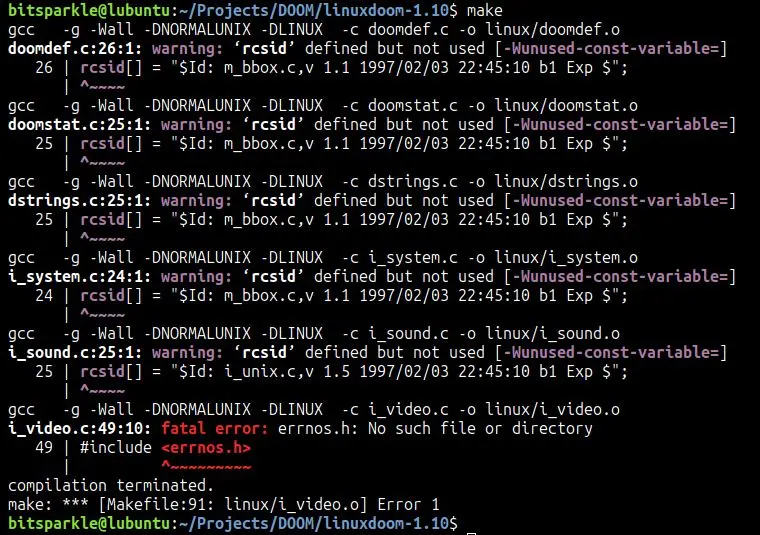 Let's start. First error.
This was solved simply by removing the extra s from errnos.h
The errno library is a C standard, I have no idea why that s was there.
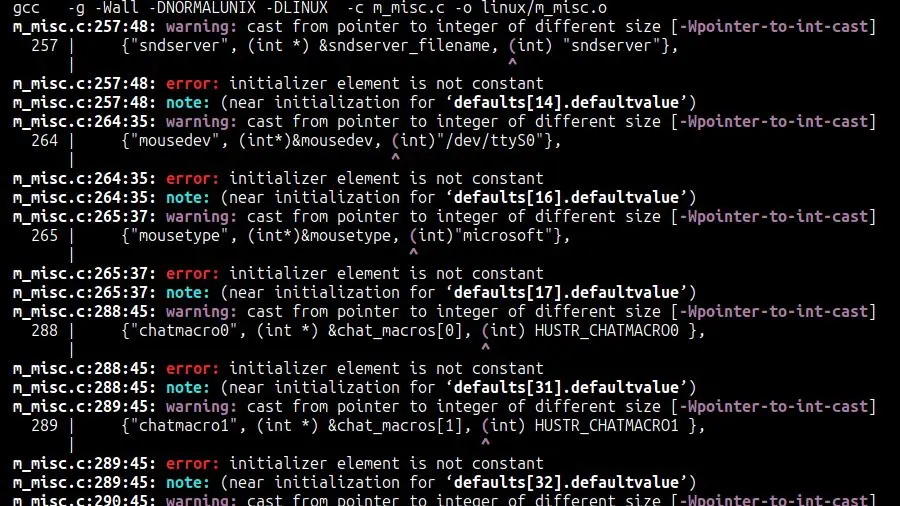 Moving on.
Here things get more complex.
Moving on.
Here things get more complex.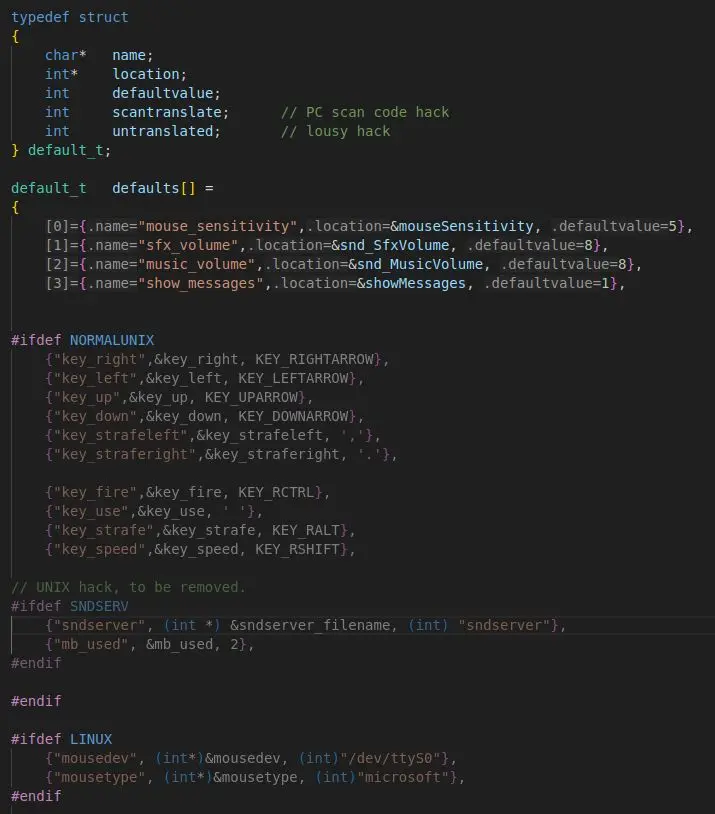 The piece of code in question is this.
It is the initialization of the Struct that contains the default settings.
Here is one of the many oddities of C. We have a string that is converted into an integer value.
This is the third element of the Struct, called defaultvalue, which should be an integer.
In fact, for example, we see that the value with the "mouse_sensitivity" key has a default of 5.
What is the conversion achieving? It takes the address of the string's starting character and casts it into an integer.
The resulting integer, therefore, holds a memory address.
This is quite ingenious, as addresses are generally handled by typed pointers. This technique enables the use of the same variable to store either actual numerical values or memory addresses that denote the beginning of a string.
A solution that is quite unsettling by modern standards, but we are talking about a codebase from more than 30 years ago, these tricks were commonplace.
The problem is that an int is a 32 bit value, while a pointer on a 64 bit system is, in fact, 64 bits large, so that cast cannot work.
It is necessary to ensure that the type of defaultvalue in the Struct is large enough to contain a 64 bit value, so long long (64 bits) is enough. All other casts will also need to be modified from int to long long.
Observation: those strings are defined as a global value, they are not found in any function, so those addresses will be valid for the entire duration of the program.
Moving on.
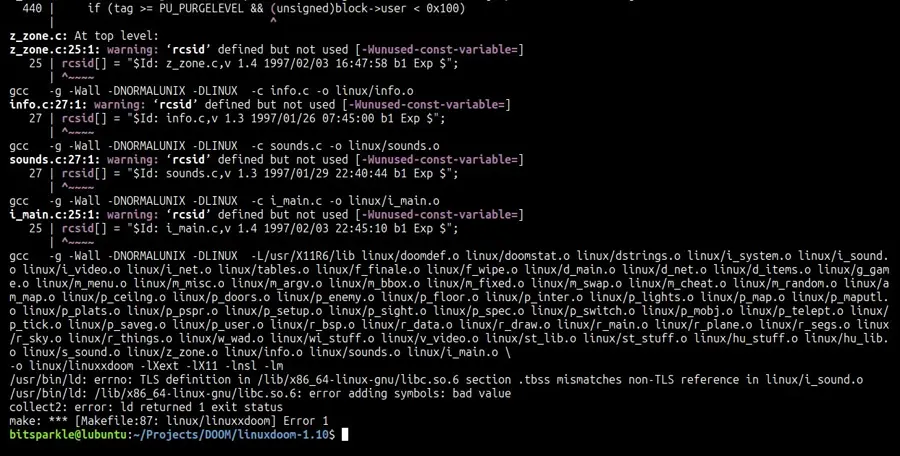
Excluding the many warnings that were completely ignorable, all the code compiled correctly (at least apparently), there is only a problem with the linker. It’s a problem with the file i_sound.c, even if nothing else is told to us.
It took me a while to understand the problem, failing miserably. From here, I followed Diego’s blog step by step. For more insight, I refer you to his original article.
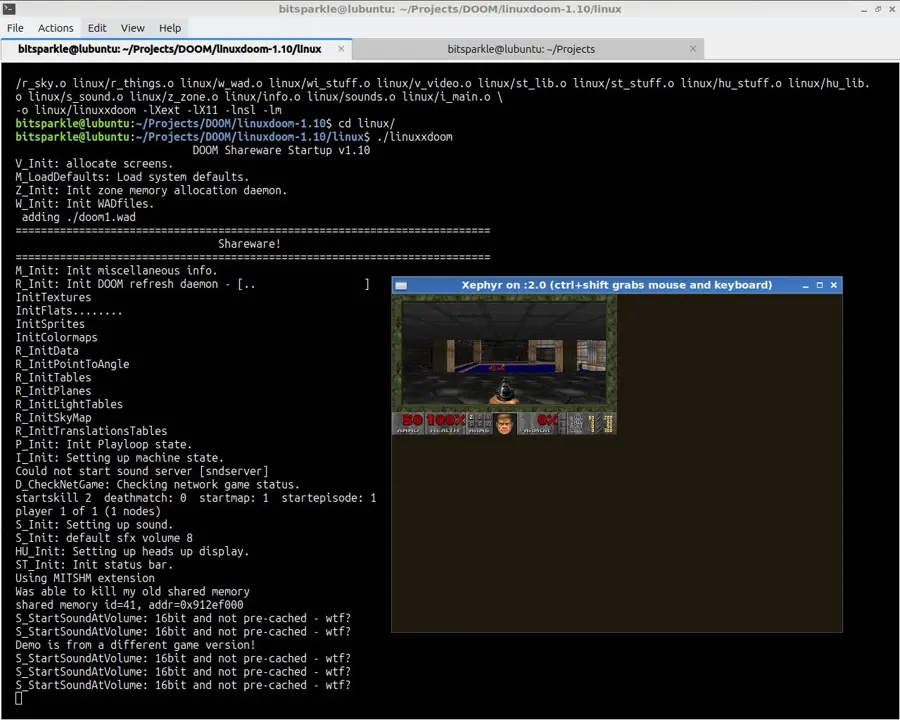 In the end, the code was compiled on Linux and the game started.
This will serve as the foundation for the Flutter implementation.
CHAPTER 2 - Let's try compiling the source code on Flutter
So I created a new empty Flutter project and copied/pasted the Doom source inside it.
I created CMakeLists.txt based on the configurations found in the original Makefile.
The final goal is for the shared object libdoom.so to be created, which is the input for dart:ffi
I am currently working on the Android port; I will work on the iOS port later.
Clearly, the source code in its current form is unusable for my needs. It requires significant modification to leverage Flutter's graphics system and manage input. But first and foremost, it must compile without errors.
Flutter uses Clang for Android compilation, a compiler that, as I quickly found out, has notable differences compared to gcc.
From here on, there will be no guide to cover my back, I'm in my own hands :-)
First error: values.h does not exist on Android.
flutterdoom/android/app/src/main/linuxdoom-1.10/doomtype.h:42:10:
fatal error: 'values.h' file not found
   42 | #include <values.h>
      |          ^~~~~~~~~~
1 error generated.
Apparently values.h was the old name for limits.h, so I make a substitution.
Ok it works, now the error is another one.
flutterdoom/android/app/src/main/linuxdoom-1.10/l_net.c:76:17:
error: use of undeclared identifier 'IPPORT_USERRESERVED'
   76 | int   DOOMPORT =  (IPPORT_USERRESERVED +0x1d );
IPPORT_USERRESERVED is missing, which is not defined in Android libraries. I add the definition in the file i_net.h, the value should be 5000 (I searched online).
It won’t be needed anyway, as I won’t have network support.
Another flutter run, other errors (oh boy this will be long).
flutterdoom/android/app/src/main/linuxdoom-1.10/m_fixed.c:63:19:
error: use of undeclared identifier 'MININT'
     63 |         return (a^b)<0 ? MININT : MAXINT;
        |                          ^

flutterdoom/android/app/src/main/linuxdoom-1.10/m_fixed.c:63:28:
error: use of undeclared identifier 'MAXINT'
     63 |         return (a^b)<0 ? MININT : MAXINT;
        |                                   ^
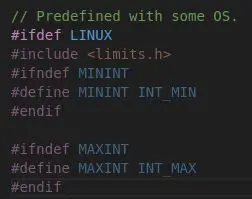 MININT and MAXINT were defined in the old values.h and are not present in limits.h (where INT_MIN and INT_MAX are present instead).
So I go back to doomtype.h and add them.
I do the same thing in m_bbox.h
flutterdoom/android/app/src/main/linuxdoom-1.10/am_map.c:786:12:
error: type specifier missing, defaults to 'int'; ISO C99 and later do not support implicit int [-Wimplicit-int]
    786 |     static nexttic = 0;
        |     ~~~~~~ ^
        |     int

flutterdoom/android/app/src/main/linuxdoom-1.10/am_map.c:859:14:
error: type specifier missing, defaults to 'int'; ISO C99 and later do not support implicit int [-Wimplicit-int]
859 |     register    outcode1 = 0;
    |     ~~~~~~~~    ^
    |     int

flutterdoom/android/app/src/main/linuxdoom-1.10/am_map.c:860:14:
error: type specifier missing, defaults to 'int'; ISO C99 and later do not support implicit int [-Wimplicit-int]
860 |     register    outcode2 = 0;
    |     ~~~~~~~~    ^
    |     int

flutterdoom/android/app/src/main/linuxdoom-1.10/am_map.c:861:14:
error: type specifier missing, defaults to 'int'; ISO C99 and later do not support implicit int [-Wimplicit-int]
861 |     register    outside;
    |     ~~~~~~~~    ^
    |     int

flutterdoom/android/app/src/main/linuxdoom-1.10/am_map.c:992:12:
error: type specifier missing, defaults to 'int'; ISO C99 and later do not support implicit int [-Wimplicit-int]
992 |     static fuck = 0;
    |     ~~~~~~ ^
    |     int
 These are easy, just add int after static and register.
Note the variable named "fuck", it looks like someone gave up on finding a meaningful name. xD
flutterdoom/android/app/src/main/linuxdoom-1.10/i_video.c:32:10:
fatal error: 'X11/Xlib.h' file not found
    32 | #include <X11/Xlib.h>
    |          ^~~~~~~~~~~~
1 error generated
Ok, we are getting closer. The compiler is telling me it can’t find any X11 header, and this is perfectly fine because Android doesn’t use X11 but a proprietary graphics subsystem.
In the next step, I will use Doom’s framebuffer output directly, eliminating the need for an external graphics subsystem.
I’ve successfully stripped all X11 references out of i_video.c. I expect to be returning to this file quite often later in the project.
Moving on. These errors never end.
flutterdoom/android/app/src/main/linuxdoom-1.10/r_segs.c:165:32:
error: use of undeclared identifier 'MAXSHORT'
165 |         if (maskedtexturecol[dc_x] != MAXSHORT)
    |                                       ^

flutterdoom/android/app/src/main/linuxdoom-1.10/r_segs.c:185:31:
error: use of undeclared identifier 'MAXSHORT'
185 |             maskedtexturecol[dc_x] = MAXSHORT;
    |                                      ^
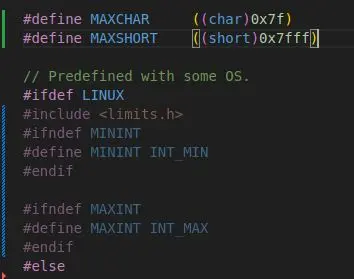 The definition of MAXSHORT is actually present in doomtype.h, but not on the Linux branch, so I simply take it out of the branch and make it universal.
flutterdoom/android/app/src/main/linuxdoom-1.10/m_misc.c:257:48:
error: initializer element is not a compile-time constant
257 | {"sndserver", (int *) &sndserver_filename, (long long) "sndserver"},
| ^~~~~~~~~~~~~~~~~~~~~~~
Look who’s back, the defaults data structure. Apparently, Clang, unlike gcc, requires defaultvalue to be an already known at compile time constant. I tried everything I could think of here, but no solution worked. I even consulted an LLM (I don’t do this very often) but no solution was found. In the end, I decided to put the integer 0 in place of those addresses, since it’s not a critical section of the code, and the audio won’t be present for now, regardless.
The compilation finally succeeds, although there is still another error.

The displayed error does not give me any useful information.
Now, I need to enable the output of the messages generated by the Doom engine.
To handle this, I reused the debug.h header from the Omnichord project. It just contains a LOG macro that calls the Android function __android_log_print.
The necessary steps are to globally replace all printf calls with LOG and ensure the header is imported in the relevant files.
After making that change, I was immediately hit with new compilation errors. I definitely wasn’t expecting that.
flutterdoom/android/app/src/main/linuxdoom-1.10/doomtype.h:34:22:
error: expected identifier
    34 | typedef enum {false, true} boolean;
    |                      ^
Android/Sdk/ndk/28.2.13676358/toolchains/llvm/prebuilt/linux-x86_64/lib/clang/19/include/stdbool.h:21:14:
note: expanded from macro 'true'
    21 | #define true 1
    |              ^
2 errors generated.
The explanation is brief: debug.h includes android/log.h. Since android/log.h pulls in stdbool.h, it’s creating a conflict.
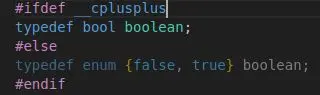 Here is the relevant code snippet. Since the boolean type didn't exist 30 years ago, it was implemented using an enum like this.
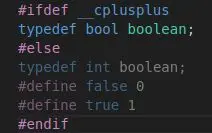 My solution. Simple and functional.
Whenever true and false are used in the code, the compiler will substitute them with the integers 1 and 0.
We finally got there: the compilation succeeded, and this time, there were no red errors. However, I’m getting a Lost connection to device message and nothing appears on the screen.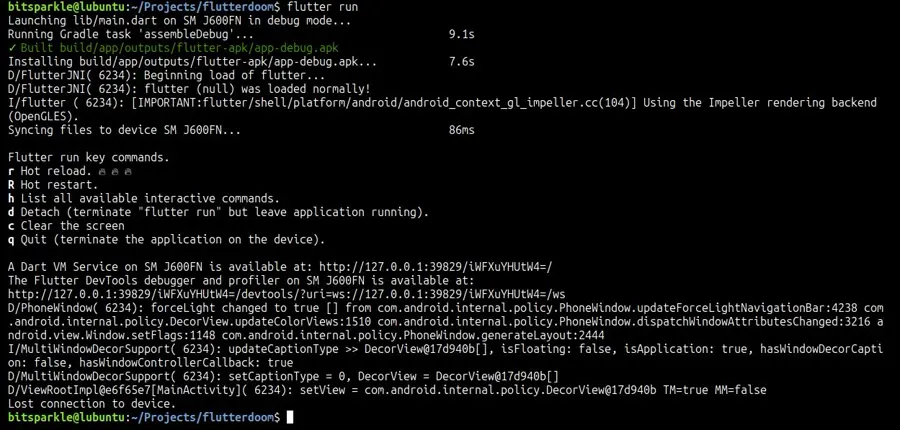 Actually, that makes sense, because I missed one fundamental detail.
Even though the C code compiled successfully, dart:ffi is not invoking it. I now need to switch back to the Flutter side and configure the necessary communication link between Flutter and C.
First, I must find Doom’s main function. Located in i_main.c, it just reads the command line parameters and calls D_DoomMain().
Moving over to Dart now. I’ve configured it to load the libdoom.so library and directly call D_DoomMain().
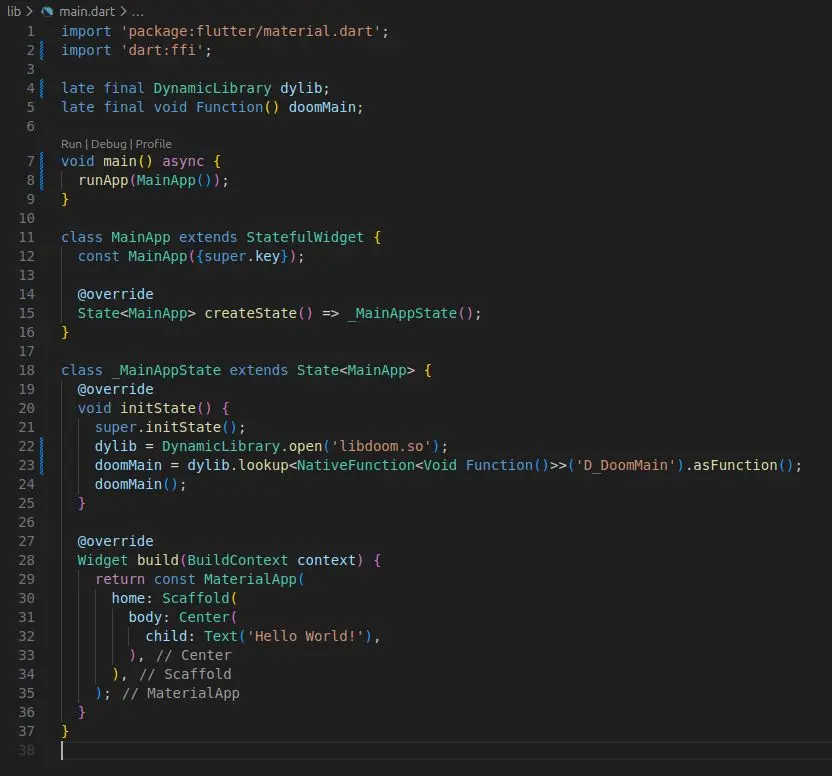 For the moment, my priority is verifying functionality, so the codebase will be kept as minimal as possible.
I simply need to confirm that D_DoomMain() initializes correctly.
The decisive moment has arrived…
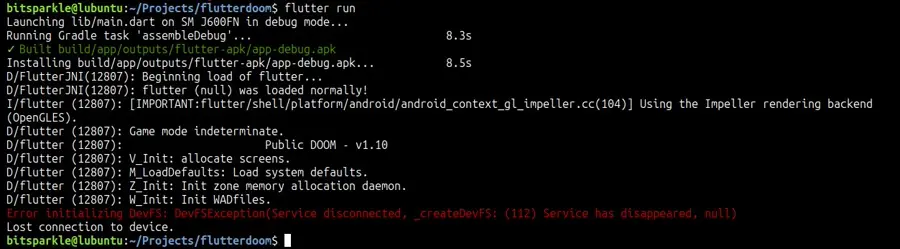
IT WORKS!!!
Well, it’s not actually running, but it did manage to enter D_DoomMain and start spitting out messages. I’m thrilled! :-)
It stops right after saying “Init WADfiles”, which makes sense, as the WAD file is actually missing.
Brief explanation: The Doom engine contains no hardcoded assets or level descriptions. All this data is stored in a file with the WAD extension. The only difference between Doom Shareware, Doom 1, and Doom 2 is the WAD file itself; the core engine remains identical.
The engine expects to locate this file in the same directory as the executable or the .so file, in our case. This leads me to a dilemma.
CHAPTER 3 - How the heck do I read the WAD file?
 This isn't a trivial question, as the app's installation path on the system (Android or iOS) is obscured by the operating system. I have no idea where it's located or how to retrieve that path. Furthermore, I'm not sure if it's the same directory where libdoom.so resides.
The solution I came up with is to bundle the WAD file as an asset. Upon startup, the app will retrieve and copy the asset into the user directory, as this is the only location it can write to.
We can access this user directory path using the getApplicationDocumentsDirectory() function provided by Flutter's path_provider library.
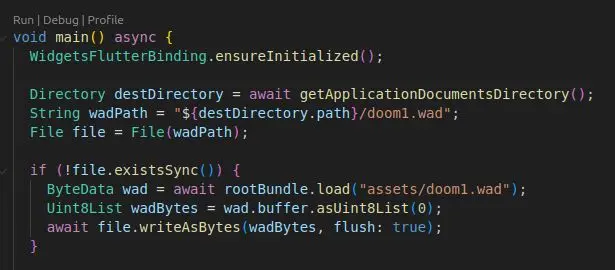 This is the boilerplate I set up. Nothing particularly complex.
The WAD is copied only the first time the app starts.
Passing a string with dart:ffi is done the C way: by passing a pointer to Utf8, which corresponds to char:
doomMain = dylib.lookup<NativeFunction<Void Function(Pointer<Utf8>)>>('D_DoomMain').asFunction();
doomMain(widget.wadPath.toNativeUtf8());   // It is necessary to convert the String object in this way
I pass this string to the MainApp Widget, which then forwards it to D_DoomMain using dart:ffi, and finally, it’s passed to the Doom’s IdentifyVersion function, which I have appropriately modified.
This function determines the Doom version by examining the WAD file name.
The Shareware WAD is named doom1.wad, the full version is doom.wad, and then there’s doom2.wad. I’m currently using the Shareware version.
I’m skipping the IdentifyVersion code here because the article is getting long, and the function is just a series of comparisons.
The trick did the job! The Shareware version is recognized, and this also gives the engine access to the app’s user path, which we’ll need for handling game savestates later.
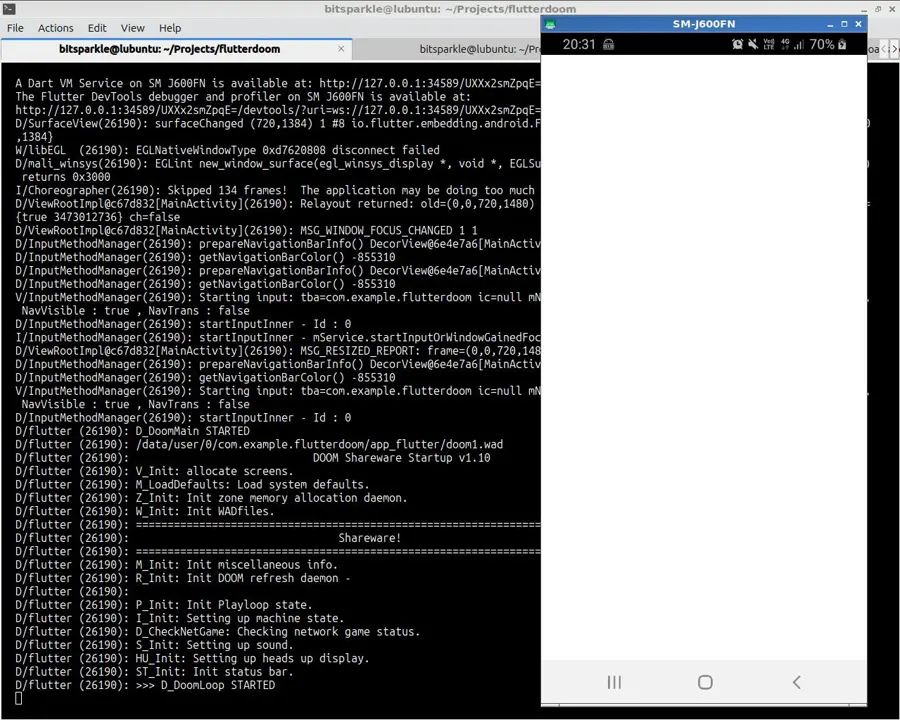
I manually added the D_DoomLoop STARTED message at the entry point of D_DoomLoop, the function containing the game’s main infinite loop.
So, the Doom start screen is technically running, even if we can’t see it.
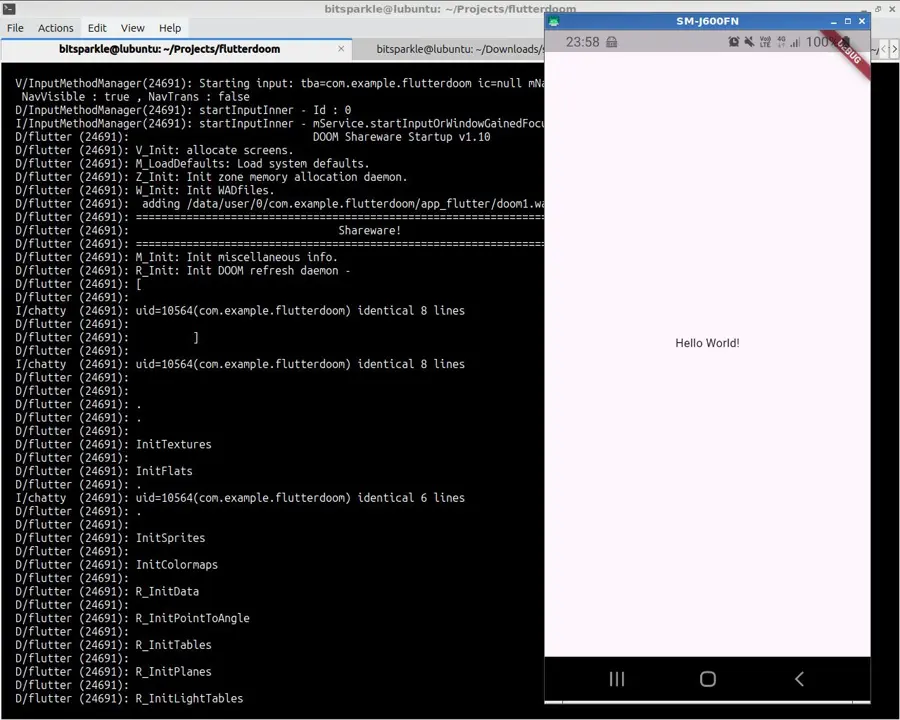
Also not visible is Flutter’s “Hello World” on my device, which is showing a blank page, which was, in fact, predictable. Let’s examine the reason.
CHAPTER 4 - One Thread is not enough
Since Flutter is single threaded, the cause is obvious: starting D_DoomLoop prevents D_DoomMain from ever returning, which in turn halts doomMain on the Flutter side. The result is a blocked initState, and the Widget's build method never executes.
The solution is to run Doom on a new Thread, and here I have 2 possible solutions:
- try Dart's Isolate;
- create a new Thread with C.
But I got lazy and decided to implement the new thread in C instead.
I know C threading well; it’s a quick job: just a couple of lines of code and minor modification to the main.
Here is the recipe:
- add #include <pthread.h> in the file d_main.c;
- create the function FlutterDoomStart which will be responsible for creating the Thread for D_DoomMain.
I pass the arguments for D_DoomMain through the struct ThreadArgs.
I allocated ThreadArgs on the heap because otherwise, on the stack, it would have been destroyed at the end of the FlutterDoomStart function.
typedef struct ThreadArgs { char* wad_path; } ThreadArgs; // ... void FlutterDoomStart(char* wad_path) { pthread_t doom_thread; ThreadArgs* thread_args = malloc(sizeof(ThreadArgs)); if (thread_args == NULL) { LOG("ThreadArgs error"); return; } thread_args->wad_path = wad_path; if (pthread_create(&doom_thread, NULL, &D_DoomMain, thread_args) != 0) { LOG("pthread_create error"); return; } return; } - appropriately modify D_DoomMain.
void* D_DoomMain (void* args)
{
    ThreadArgs* thread_args = (ThreadArgs*)args;
    // ...
And it works perfectly.
CHAPTER 5 - I need the framebuffer
We've reached a crucial step. We need to retrieve the framebuffer of the Doom engine.
The framebuffer is a memory area where information to be displayed on the screen is stored. It is usually an array of screen width x height size, where each element is an appropriately encoded color.
Analyzing D_DoomMain I found this:
// init subsystems
LOG ("V_Init: allocate screens.\n");
V_Init ();
There’s no question about it, this is the piece of code that interests me. Let’s see what’s inside V_Init()
void V_Init (void)
{
    int		i;
    byte*	base;

    // stick these in low dos memory on PCs

    base = I_AllocLow (SCREENWIDTH*SCREENHEIGHT*4);

    for (i=0 ; i<4 ; i++)
    screens[i] = base + i*SCREENWIDTH*SCREENHEIGHT;
}
Well, here it is. I was surprised to find four framebuffers. A quick bit of research confirms that screens[0] is the one we want; the others handle the wipe transition (a topic for another time) and the status bar.
The plan is to create the framebuffer on the Flutter side and then pass its address to D_DoomMain.
But before that, let’s make sure Doom only allocates screens[1], screens[2], and screens[3].
void V_Init (void)
{
    int		i;
    byte*	base;

    // stick these in low dos memory on PCs

    base = I_AllocLow (SCREENWIDTH*SCREENHEIGHT*3);

    for (i=1 ; i<4 ; i++)
	screens[i] = base + i*SCREENWIDTH*SCREENHEIGHT;
}
There is something wrong, right? Some of you will have already noticed a bug as big as a house. Unfortunately, I will notice it much later, but we will get to that :-)
On the Flutter side, therefore, I need to allocate a buffer large enough for Doom, sized 320 * 200.
The required type is byte, which is nothing more than an alias for unsigned char.
dart:ffi provides this native type, along with the malloc function.
I passed the framebuffer pointer to FlutterDoomStart.
The code is messy now (all in main with a global framebuffer), but I’ll do a major refactoring when the project is finished to clean up the structure.
Right now, rapid experimentation takes precedence over strict formalities.
Pointer<UnsignedChar> framebuffer = malloc<UnsignedChar>(320 * 200);

// ...

class MainApp extends StatefulWidget {
  final String wadPath;

  const MainApp({super.key, required this.wadPath});

  @override
  State<MainApp> createState() => _MainAppState();
}

class _MainAppState extends State<MainApp> {
  @override
  void initState() {
    super.initState();
    final dylib = DynamicLibrary.open('libdoom.so');
    final void Function(Pointer<Utf8>, Pointer<UnsignedChar>) flutterDoomStart
      = dylib.lookup<NativeFunction<Void Function(Pointer<Utf8>, Pointer<UnsignedChar>)>>('FlutterDoomStart').asFunction();
    flutterDoomStart(widget.wadPath.toNativeUtf8(), framebuffer);
  }

  /// ...
Back in C, FlutterDoomStart has become like this:
typedef struct ThreadArgs {
    char* wad_path;
    byte* external_fb;
} ThreadArgs;

// ...

void FlutterDoomStart(char* wad_path, byte* external_fb) {
    pthread_t doom_thread;

    ThreadArgs* thread_args = malloc(sizeof(ThreadArgs));
    if (thread_args == NULL) {
        LOG("ThreadArgs error");
        return;
    }
    thread_args->wad_path = wad_path;
    thread_args->external_fb = external_fb;

    if (pthread_create(&doom_thread, NULL, &D_DoomMain, thread_args) != 0) {
        LOG("pthread_create error");
        return;
    }

    return;
}
Finally, I also need to assign the Flutter framebuffer address to screen[0]:
// init subsystems
LOG ("V_Init: allocate screens.\n");
V_Init ();
screens[0] = thread_args->external_fb;
I know I should have done it inside V_Init, but well, I figured, what the hell.
So everything is ready. I’ll relaunch “flutter run” to confirm that there are no errors, and everything compiles correctly.
CHAPTER 6 - And now what do I do with the framebuffer?
Now two problems arise.
First: how do I display the framebuffer on Flutter? I need an equivalent of the html tag <canvas>, which allows for pixel by pixel drawing.
I do some research and discover that in Flutter the closest thing to canvas is the CustomPaint Widget. Ok, let's say the problem is solved, writing the boilerplate is required, but it won't be difficult.
Second problem: Doom's framerate is 35hz, so the framebuffer is updated 35 times per second.
This means that my "screen" will somehow have to be synchronized with Doom. In other words, Flutter needs to know when a new frame is ready to be displayed.
How do I do it?
I need Doom to send data to Flutter. Now, dart:ffi does the opposite without problems, which is sending messages from Flutter to C.
Reversing the direction is a less trivial and not very well documented matter, but it can be done.
I've already successfully tested this exact solution in the Omnichord app.
The "guide", if we want to call it that, is a 2021 post on StackOverflow written by Daco Harkes, a Google engineer.
Here is the code I implemented. I won't explain too much, as the entire API is a black box to me; I just know it works and relies on Dart Isolates.
- In the Doom codebase, I created a folder called dart and imported all the files found in the Flutter SDK directory bin/cache/dart-sdk/include
- I created a small interface, called dart_interface.c
#include "dart_interface.h" Dart_Port dart_receive_port = ILLEGAL_PORT; void registerDartPort(Dart_Port port) { dart_receive_port = port; } void notifyDartFrameReady() { if (dart_receive_port == ILLEGAL_PORT) { return; } Dart_PostInteger_DL(dart_receive_port, 0); } - I added the call to notifyDartFrameReady() right after D_Display within D_DoomLoop (a decision we will regret later):
// Update display, next frame, with current state. D_Display (); notifyDartFrameReady(); - I added dart/dart_api_dl.c and dart_interface.c to the SOURCES of CMakeLists.txt
- On the Flutter side, I created a new StatefulWidget called Doom which is initialized this way:
framebuffer = malloc<UnsignedChar>(framebufferSize);
framebuffer32 = Uint32List(framebufferSize);

ui.Image? frame;

@override
  void initState() {
    super.initState();
    nativePort = receivePort.sendPort.nativePort;
    final dylib = DynamicLibrary.open('libdoom.so');

    final int Function(Pointer<Void>) dartInitializeApiDL =
      dylib.lookup<NativeFunction<IntPtr Function(Pointer<Void>)>>('Dart_InitializeApiDL').asFunction();

    dartInitializeApiDL(NativeApi.initializeApiDLData);

    final void Function(int) registerDartPort =
      dylib.lookup<NativeFunction<Void Function(Int64)>>('registerDartPort').asFunction();

    registerDartPort(nativePort);

    receivePort.listen((dynamic message) async {
      // Invoked at new frame ready

      for (int i=0; i<framebufferSize; i++) {
        framebuffer32[i] = 0xFF000000 | (framebuffer[i] << 16) | (framebuffer[i] << 8) | (framebuffer[i]);
      }

      var immutableBuffer = await ImmutableBuffer.fromUint8List(framebuffer32.buffer.asUint8List());

      final ui.Codec codec = await ui.ImageDescriptor.raw(
        immutableBuffer,
        width: 320,
        height: 200,
        rowBytes: null,
        pixelFormat: ui.PixelFormat.rgba8888,
      ).instantiateCodec();

      final ui.FrameInfo frameInfo = await codec.getNextFrame();
      frame = frameInfo.image;

      setState(() {});
    });

    final void Function(Pointer<Utf8>, Pointer<Uint8>) flutterDoomStart
      = dylib.lookup<NativeFunction<Void Function(Pointer<Utf8>, Pointer<Uint8>)>>('FlutterDoomStart').asFunction();

    flutterDoomStart(widget.wadPath.toNativeUtf8(), framebuffer);
  }
This function is almost entirely incomprehensible boilerplate. My fault, but as already mentioned, when I’m in full experimentation, I write things in the dirtiest and fastest way possible; only much later in the projects do I worry about refactoring and maybe writing some comments.
What we need to know about this function is this:
the callback connected to receivePort.listen is invoked every time D_DoomLoop calls notifyDartFrameReady.
(To be precise, every time Dart_PostInteger_DL is called, the value 0 that I attach to the function arrives at the receiving callback via the argument dynamic message; in this specific case, it is not necessary to manage the received message because I only need to know when the new frame is ready)
The framebuffer is then converted into a frame that Flutter’s CustomPaint can easily process, and finally setState is called to force the widget to rebuild. As we established, this function runs 35 times per second.
Key point on this conversion:
for (int i=0; i<framebufferSize; i++) {
  framebuffer32[i] = 0xFF000000 | (framebuffer[i] << 16) | (framebuffer[i] << 8) | (framebuffer[i]);
}
We said that Doom’s framebuffer is 8 bit -> 256 colors, while CustomPaint accepts 24 bit images -> about 16 million colors.
Therefore, individual pixels must be converted from 8 bit to 24 bit.
The issue is that Doom’s color palette is currently an “unknown” factor for me. I plan to dedicate an entire chapter to it later.
To ensure something appears on the screen, I’ve decided to convert the input bytes into 24 bit grayscale values, meaning equal amounts of red, green, and blue. I can deal with the actual colors later.
The CustomPaint is like this:
@override
  Widget build(BuildContext context) {
    if (frame == null) {
      return Text("Doom is starting..".);
    }
    else {
      return CustomPaint(
        painter: FramebufferPainter(),
        size: const ui.Size(320, 200)
      );
    }
  }
}

class FramebufferPainter extends CustomPainter {
  FramebufferPainter();

  @override
  void paint(ui.Canvas canvas, ui.Size size) {
    final Rect src = Rect.fromLTWH(0, 0, frame!.width.toDouble(), frame!.height.toDouble());
    final Rect dst = Rect.fromLTWH(0, 0, size.width, size.height);
    canvas.drawImageRect(frame!, src, dst, Paint());
  }

  @override
  bool shouldRepaint(CustomPainter oldDelegate) {
    return true;
  }
}
That’s enough, I’m bored with all this nonsensical code, let’s see if we’ve actually achieved anything.
The quality is bad, but all this hard work resulted in this, and it feels like the greatest thing ever.
FLUTTER IS RUNNING DOOM.
The starting screen of Doom, to be exact :-)
Something is strange though. As I recall, after a few seconds of inactivity, the demo game should start, the prerecorded one where the character moves on its own. In fact, I was hoping for this; this experiment was supposed to end with managing the color palette and the game running by itself.
Instead, nothing happens.
On the console, with every image change, this message appears:
D/flutter ( 9703): Demo is from a different game version!
I do some research, and it turns out that the demo games are prerecorded in the WAD (which I had already figured out), and that all WADs are version 1.9, while the source code is version 1.10
There is no way to find WADs fully compatible with version 1.10; it seems they don't exist.
I have no choice; I must do something I was trying to avoid, but it's now essential. I bet this project is going to expand well beyond my initial expectations.
CHAPTER 7 - Apparently I'm forced to map inputs (and make them Thread Safe)
You know when YouTubers start the video by saying "I didn't want to make this video".
Well, I didn't want to do this development :-) But I've come this far, there's no point in stopping.
I need to provide Doom with input signals just to confirm the game is starting correctly.
In doomdef.h I find the complete key mapping; almost all keys are there, and the missing ones are simply the usual ASCII codes (for example the space key equals the integer 32).
// DOOM keyboard definition.
// This is the stuff configured by Setup.Exe.
// Most key data are simple ascii (uppercased).
//
#define KEY_RIGHTARROW	0xae
#define KEY_LEFTARROW	0xac
#define KEY_UPARROW	0xad
#define KEY_DOWNARROW	0xaf
#define KEY_ESCAPE	27
#define KEY_ENTER	13
#define KEY_TAB		9
#define KEY_F1		(0x80+0x3b)
#define KEY_F2		(0x80+0x3c)
#define KEY_F3		(0x80+0x3d)
#define KEY_F4		(0x80+0x3e)
#define KEY_F5		(0x80+0x3f)
#define KEY_F6		(0x80+0x40)
#define KEY_F7		(0x80+0x41)
#define KEY_F8		(0x80+0x42)
#define KEY_F9		(0x80+0x43)
#define KEY_F10		(0x80+0x44)
#define KEY_F11		(0x80+0x57)
#define KEY_F12		(0x80+0x58)

#define KEY_BACKSPACE	127
#define KEY_PAUSE	0xff

#define KEY_EQUALS	0x3d
#define KEY_MINUS	0x2d

#define KEY_RSHIFT	(0x80+0x36)
#define KEY_RCTRL	(0x80+0x1d)
#define KEY_RALT	(0x80+0x38)

#define KEY_LALT	KEY_RALT
I’ll create a C function, DartPostInput, which will receive signals from Dart and, in turn, pass them to D_PostEvent, the Doom function responsible for handling all event types (keyboard, mouse, controller).
This function accepts an event_t Struct, which is composed of two fields: the ASCII code of the pressed key and the gesture type (down/up).
void DartPostInput(int dart_key, int dart_pressed_down) {
  event_t new_event;
  new_event.data1 = dart_key;
  new_event.type = dart_pressed_down ? ev_keydown : ev_keyup;
  D_PostEvent(&new_event);
}

//
// D_PostEvent
// Called by the I/O functions when input is detected
//
void D_PostEvent (event_t* ev)
{
  events[eventhead] = *ev;
  eventhead = (++eventhead)&(MAXEVENTS-1);
}
On the Flutter side, I’m creating a class to handle the complete key mapping.
class AsciiKeys {
  static const Map<String, int> keyCodes = {
    "KEY_RIGHTARROW": 0xae,
    "KEY_LEFTARROW": 0xac,
    "KEY_UPARROW": 0xad,
    "KEY_DOWNARROW": 0xaf,
    // ...
    "5": 53,
    "6": 54,
    "7": 55,
    "Y": 121
  };
}
I’m defining the dartPostInput function on the dart:ffi side; this function will be invoked on every button’s eventDown and eventUp. It will accept two integers for Doom: the key’s ASCII code and the gesture type, where 1 indicates the key is pressed and 0 indicates it is released.
final void Function(int, int) dartPostInput =
  dylib.lookup<NativeFunction<Void Function(Int32, Int32)>>('DartPostInput').asFunction();
This entire procedure should work, but it has a major flaw: it’s not Thread Safe. I am perfectly aware of this.
The call to DartPostInput occurs from the main Thread, which is not the one where the Doom engine is running.
The D_PostEvent function is then called from the same Thread, which writes to the circular buffer events.
It could happen that the UI thread is paused before it has finished writing the event_t structure to the current index of events. This means it’s possible that the “worker” function responsible for reading events reads incorrect data and the software crashes or has undefined behavior.
The problem could also arise with the eventhead index, which is also a shared resource between the two Threads.
Let’s try to make everything Thread Safe. The pthread.h library provides the mutex system, which is what I need. It’s a simple operation: Upon entering D_PostEvent I acquire the mutex, and after performing the write operations, I release it.
The function that reads the buffer will have to wait for the mutex to be released to access events.
Let’s modify D_PostEvent:
#include <pthread.h>
pthread_mutex_t event_mutex = PTHREAD_MUTEX_INITIALIZER;

// ...

void D_PostEvent (event_t* ev)
{
  pthread_mutex_lock(&event_mutex);

  events[eventhead] = *ev;
  eventhead = (++eventhead)&(MAXEVENTS-1);

  pthread_mutex_unlock(&event_mutex);
}
The function responsible for reading the circular buffer events is D_ProcessEvents:
void D_ProcessEvents (void)
{
    event_t*	ev;

    // IF STORE DEMO, DO NOT ACCEPT INPUT
    if ( ( gamemode == commercial ) && (W_CheckNumForName("map01")<0) )
        return;

    for ( ; eventtail != eventhead ; eventtail = (++eventtail)&(MAXEVENTS-1) )
    {
        ev = &events[eventtail];
        if (M_Responder (ev))
            continue;               // menu ate the event
        G_Responder (ev);
    }
}
I modify it as follows:
void D_ProcessEvents (void)
{
    event_t*	ev;
    event_t 	ev_copy;
    int 	localhead;

    // IF STORE DEMO, DO NOT ACCEPT INPUT
    if ( ( gamemode == commercial ) && (W_CheckNumForName("map01")<0) )
        return;

    pthread_mutex_lock(&event_mutex);
    localhead = eventhead;

    for ( ; eventtail != localhead ; eventtail = (++eventtail)&(MAXEVENTS-1) )
    {
        ev_copy = events[eventtail];
        pthread_mutex_unlock(&event_mutex);

        ev = &ev_copy;

        if (M_Responder (ev))
            goto continue_loop;               // menu ate the event
        G_Responder (ev);

        continue_loop:
        pthread_mutex_lock(&event_mutex);
    }

    pthread_mutex_unlock(&event_mutex);
}
D_ProcessEvents acquires the lock, and this only happens if the lock is not already acquired by D_PostEvent. It locally copies the eventhead index, enters the loop, and also locally copies the event_t structure. At this point the lock is released.
D_PostEvent is therefore free to do what it wants, and this is because D_ProcessEvents will work on data present only within itself and no longer on global variables.
Then the functions M_Responder and G_Responder are called, which are responsible for actually processing the data, and at the end of the loop, the lock is reacquired. In this way, when the loop restarts, the update of eventtail is also protected, which we recall is a global variable.
The new event is copied locally again and so on.
Once out of the loop, the lock is finally released.
Having done this, I quickly create a rudimentary, very ugly controller on Flutter with a combination of Container, Row, and Column.
Time to find out if I can get into the actual game.
The good news is that the keys work, I can enter the menu.
The bad news, however, is that I can’t get into the game; I get a SIGSEGV error and the program terminates.
F/libc    (18384): Fatal signal 11 (SIGSEGV), code 1 (SEGV_MAPERR), fault addr 0x14 in tid 18771 (ple.flutterdoom), pid 18384 (ple.flutterdoom)
*** *** *** *** *** *** *** *** *** *** *** *** *** *** *** ***
Build fingerprint: 'samsung/j6ltexx/j6lte:10/QP1A.190711.020/J600FNXXSACVB1:user/release-keys'
Revision: '2'
ABI: 'arm'
Timestamp: 2025-12-04 23:14:47+0100
pid: 18384, tid: 18771, name: ple.flutterdoom  >>> com.example.flutterdoom <<<
uid: 10568
signal 11 (SIGSEGV), code 1 (SEGV_MAPERR), fault addr 0x14
Cause: null pointer dereference
    r0  00000000  r1  00000001  r2  00000000  r3  00000000
    r4  a7a2a230  r5  a7a2a230  r6  a7a2a230  r7  a7a29f30
    r8  000047d0  r9  000047d0  r10 ebe4e034  r11 a7a2a230
    ip  a5bd62b4  sp  a7a29f08  lr  a5ba523d  pc  a5bd17e6
backtrace:
      #00 pc 000497e6  /data/app/com.example.flutterdoom-BK0haLh0jGqqgyyiCtgFXw==/base.apk!libdoom.so (offset 0x330000) (Z_Malloc+42) (BuildId: 84f93e185bf2460ea002e280cde72fee54022427)
      #01 pc 0001d239  /data/app/com.example.flutterdoom-BK0haLh0jGqqgyyiCtgFXw==/base.apk!libdoom.so (offset 0x330000) (wipe_initMelt+104) (BuildId: 84f93e185bf2460ea002e280cde72fee54022427)
      #02 pc 0001d61f  /data/app/com.example.flutterdoom-BK0haLh0jGqqgyyiCtgFXw==/base.apk!libdoom.so (offset 0x330000) (wipe_ScreenWipe+74) (BuildId: 84f93e185bf2460ea002e280cde72fee54022427)
      #03 pc 0001dbb5  /data/app/com.example.flutterdoom-BK0haLh0jGqqgyyiCtgFXw==/base.apk!libdoom.so (offset 0x330000) (D_Display+908) (BuildId: 84f93e185bf2460ea002e280cde72fee54022427)
      #04 pc 0001ddc3  /data/app/com.example.flutterdoom-BK0haLh0jGqqgyyiCtgFXw==/base.apk!libdoom.so (offset 0x330000) (D_DoomLoop+274) (BuildId: 84f93e185bf2460ea002e280cde72fee54022427)
      #05 pc 0001f453  /data/app/com.example.flutterdoom-BK0haLh0jGqqgyyiCtgFXw==/base.apk!libdoom.so (offset 0x330000) (D_DoomMain+3026) (BuildId: 84f93e185bf2460ea002e280cde72fee54022427)
      #06 pc 000a8147  /apex/com.android.runtime/lib/bionic/libc.so (__pthread_start(void*)+20) (BuildId: 68663d64ac44a935374eee374ddf6c9d)
      #07 pc 00061467  /apex/com.android.runtime/lib/bionic/libc.so (__start_thread+30) (BuildId: 68663d64ac44a935374eee374ddf6c9d)
Lost connection to device.
The specific error is null pointer dereference, and we also have a fairly clear backtrace; it is indeed clear that the problem is related to the wipe transition, which is that bloodlike transition that slides downwards between screens.
What I can try, for the moment, is to disable the transition.
To do this, I just need to comment out a couple of code sections in the D_Display function, which is the one responsible for drawing to the screen.
  boolean wipe = false;

  //
  // ...
  //

  // save the current screen if about to wipe
  if (gamestate != wipegamestate)
  {
    wipe = true;
    wipe_StartScreen(0, 0, SCREENWIDTH, SCREENHEIGHT);
  }
  else
    wipe = false;

  //
  //...
  //

  // wipe update
  wipe_EndScreen(0, 0, SCREENWIDTH, SCREENHEIGHT);

  wipestart = I_GetTime () - 1;

  do
  {
    do
    {
      nowtime = I_GetTime ();
      tics = nowtime - wipestart;
    } while (!tics);
    wipestart = nowtime;
    done = wipe_ScreenWipe(wipe_Melt, 0, 0, SCREENWIDTH, SCREENHEIGHT, tics);
    I_UpdateNoBlit ();
    M_Drawer ();                            // menu is drawn even on top of wipes
    I_FinishUpdate ();                      // page flip or blit buffer
  } while (!done);
These are the code lines I commented out. I also forced the wipe variable to false.
The final step is to try again:
This time it really works. I am actually playing Doom using Flutter as the graphics engine :-)
This grayscale palette isn’t so bad after all; it has its charm and almost feels like playing on an old GameBoy.
But now it’s time to tackle the colors.
CHAPTER 8 - The color palette is not a trivial subject
As I mentioned quite a few lines ago, Doom's 256 colors are not part of a standard palette, at least not in modern systems.
There are several that change during the game, for example, there is the palette that turns red when the player is dying or being hit, or the one that turns green when we wear the radiation suit.
For each color, we have 1 byte for each component (red/green/blue), so each color occupies 3 bytes, and in total the complete palette occupies 768 bytes. In reality, each component does not use all 8 bits, but only the first 6.
In conclusion, Doom can display a maximum of 256 colors simultaneously, but choosing from 262,144 possible colors, which is the total number of colors representable by 18 bit numbers.
All these numbers are not random; they represents how the VGA graphics system worked on old computers with MS-DOS.
What is the best way for Doom to communicate the color palette to Flutter in realtime?
I could use the same technique adopted for the framebuffer: I allocate the array with dart:ffi, pass the array address to Doom, and ensure that the color palette is written to that memory area.
Once Flutter receives the notification that a new frame is ready, it will read the current palette and use it to translate Doom's framebuffer into the format expected by the CustomPainter.
Let's take it one step at a time. To begin, I'll allocate the array within Flutter and then modify the flutterDoomStart function:
final Pointer<Uint32> palette = malloc<Uint32>(256);

// ...

final void Function(Pointer<Utf8>, Pointer<UnsignedChar>, Pointer<Uint32>) flutterDoomStart
  = dylib.lookup<NativeFunction<Void Function(Pointer<Utf8>, Pointer<UnsignedChar>, Pointer<Uint32>)>>('FlutterDoomStart').asFunction();

flutterDoomStart(widget.wadPath.toNativeUtf8(), framebuffer, palette);
On the C side, I’ll modify the receiving function FlutterDoomStart and declare the global variable external_palette:
uint32_t* external_palette;

// ...

void FlutterDoomStart(char* wad_path, byte* external_fb, uint32_t* _external_palette) {
  external_palette = _external_palette;

  pthread_t doom_thread;

  ThreadArgs* thread_args = malloc(sizeof(ThreadArgs));
  if (thread_args == NULL) {
    LOG("ThreadArgs error");
    return;
  }
  thread_args->wad_path = wad_path;
  thread_args->external_fb = external_fb;

  if (pthread_create(&doom_thread, NULL, &D_DoomMain, thread_args) != 0) {
    LOG("pthread_create error");
    return;
  }

  return;
}
With the xternal_palette variable in place, the next step is finding the exact location in the Doom code where the write operation should occur.
The correct place is in the i_video.c file, and specifically in the I_SetPalette function. You can think of the entire i_video.c file as an OOP interface; a contract that defines empty functions to be implemented.
This is, in fact, the file that defined all the necessary boilerplate for communication with the Linux graphics subsystem, X11. Therefore, every Doom port must properly implement these functions to talk to its specific OS graphics subsystem.
Let’s see how I implemented I_SetPalette:
extern uint32_t* external_palette;

// ...

void I_SetPalette (byte* palette)
{
  for (int i=0 ; i<255 ; i++) {
    external_palette[i] = 0xFF000000;
    external_palette[i] |= (gammatable[usegamma][*palette++] & ~3) << 16;
    external_palette[i] |= (gammatable[usegamma][*palette++] & ~3) << 8;
    external_palette[i] |= (gammatable[usegamma][*palette++] & ~3);
  }
}
I iterate through the entire palette array, which as a reminder is made up of 768 bytes. The for loop runs 256 times, reading three bytes on each iteration.
For each byte, I retain the first 6 bits and zero out the last 2 using a masking operation.
Each byte is then inserted, via bitwise OR and shifting, into external_palette. This must be a 32 bit value in the PixelFormat.rgba8888 format: the bytes that compose it represent Alpha, Blue, Green, and Red, starting from the left.
Point of attention: To ensure Doom’s color gamma management (adjustable via the F11 key) works correctly, I fetch the final component value from the gammatable array, a constant defined within the Doom codebase.
Gamma correction is crucial because it allows for overall color brightening; if the image appears too dark on certain screens, gamma correction provides the necessary compensation.
Switching back to Flutter, I’m now modifying the function that is called whenever a new frame becomes available:
receivePort.listen((dynamic message) async {
  // Invoked at new frame ready

  for (int i=0; i<framebufferSize; i++) {
    framebuffer32[i] = palette[framebuffer[i]];
  }

  // ...
The 32 bit conversion has already occurred in I_SetPalette, so in this function I just need to convert the framebuffer from 8 to 32 bits by simply fetching the corresponding color from the shared palette array.
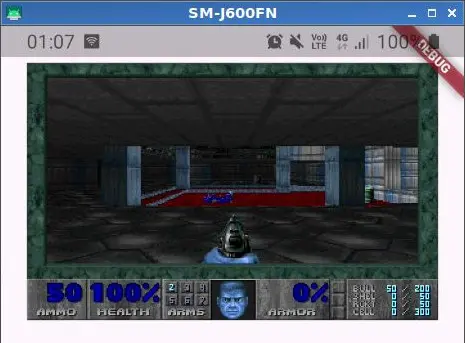 Let's try to see if it all works.
We're almost there, I just swapped blue and red, no big deal.
void I_SetPalette (byte* palette)
{
  for (int i=0 ; i<255 ; i++) {
    external_palette[i] = 0xFF000000;
    external_palette[i] |= (gammatable[usegamma][*palette++] & ~3);
    external_palette[i] |= (gammatable[usegamma][*palette++] & ~3) << 8;
    external_palette[i] |= (gammatable[usegamma][*palette++] & ~3) << 16;
  }
}
Notice how the screen turns red when I am hit by the enemy, or green when I pick up an item.
In those moments, the Doom engine is calling the I_SetPalette function with a new color palette.
Since we talked about Thread Safety in the previous chapter, it’s necessary to make an observation for the framebuffer and the palette as well.
The reading and writing of these two arrays is not atomic, and during even partial reading by Flutter, the array could be modified by Doom. So, the entire graphics subsystem I set up is NOT Thread Safe, but I believe we can live with this flaw.
The worst that can happen is a graphic glitch and nothing more. In all the tests I’ve done, this condition has never occurred because Flutter is fast enough to convert the framebuffer before Doom creates a new frame.
CHAPTER 9 - Fixing the bugs I introduced myself
The problem I want to solve is the one related to the wipe transition.
How does the wipe effect work?
Simplifying as much as possible: a copy of the starting screen is made on screens[2], then a copy of the destination screen on screens[3]. The effect then produces the transition by transforming the image on screens[2] into the one on screens[3], writing the result to screens[0].
I will now restore the sections of code that were previously commented out.
  boolean wipe;

  //
  // ...
  //

  // save the current screen if about to wipe
  if (gamestate != wipegamestate)
  {
    wipe = true;
    wipe_StartScreen(0, 0, SCREENWIDTH, SCREENHEIGHT);
  }
  else
    wipe = false;

  //
  //...
  //

  // wipe update
  wipe_EndScreen(0, 0, SCREENWIDTH, SCREENHEIGHT);

  wipestart = I_GetTime () - 1;

  do
  {
    do
    {
      nowtime = I_GetTime ();
      tics = nowtime - wipestart;
    } while (!tics);
    wipestart = nowtime;
    done = wipe_ScreenWipe(wipe_Melt, 0, 0, SCREENWIDTH, SCREENHEIGHT, tics);
    I_UpdateNoBlit ();
    M_Drawer ();                            // menu is drawn even on top of wipes
    I_FinishUpdate ();                      // page flip or blit buffer
  } while (!done);
Relaunching the app, I notice something strange: the error displayed in the console is not always the same. Furthermore, the game sometimes started, though still without the wipe effect.
This is a clear instance of undefined behavior; it suggests that the functions associated with the effect are likely attempting to access improperly initialized memory locations.
Let’s see what’s inside wipe_StartScreen.
int
wipe_StartScreen
( int	x,
  int	y,
  int	width,
  int	height )
{
  wipe_scr_start = screens[2];
  I_ReadScreen(wipe_scr_start);
  return 0;
}
It seems to copy the screen into the screens[2] framebuffer.
Let’s see what I_ReadScreen does.
void I_ReadScreen (byte* scr)
{
}
I’ve figured out what happened. When I went to remove all references to X11 in the i_video.c file, I went heavy with the axe :-)
I eliminated more than I should have. I will now proceed to restore this function. It simply provides the command for copying memory from one location to another.
void I_ReadScreen (byte* scr)
{
  memcpy (scr, screens[0], SCREENWIDTH*SCREENHEIGHT);
}
I’m relaunching the game.
The problem persists; nothing has changed. So there’s another bug somewhere else.
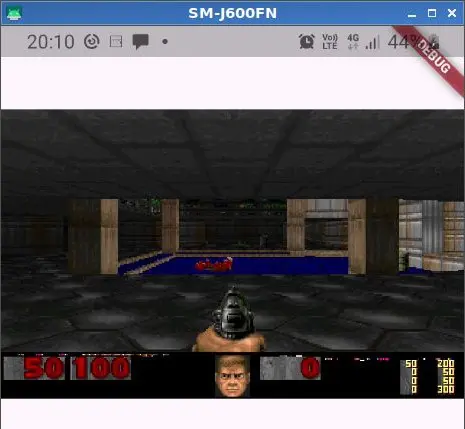 Unfortunately, the stack trace I published before is not consistent; as I already wrote, every time I start the game I get a different error.
Sometimes the game starts, but I noticed one thing: the status bar is often corrupted.
void V_Init (void)
{
  int		i;
  byte*	base;

  // stick these in low dos memory on PCs

  base = I_AllocLow (SCREENWIDTH*SCREENHEIGHT*3);

  for (i=1 ; i<4 ; i++)
    screens[i] = base + i*SCREENWIDTH*SCREENHEIGHT;
}
What happened: no longer having to allocate memory for 4 framebuffers but only 3, I had modified the parameter of I_AllocLow to allocate the necessary memory for only 3 framebuffers.
The for loop assigns the base memory address to each of the 3 framebuffers.
The problem is that, in the last framebuffer, I assign the address of an unallocated memory area, due to the incorrect offset obtained with the index i.
Here is the correct function:
void V_Init (void)
{
  int		i;
  byte*	base;

  // stick these in low dos memory on PCs

  base = I_AllocLow (SCREENWIDTH*SCREENHEIGHT*3);

  for (i=0 ; i<3 ; i++)
    screens[i+1] = base + i*SCREENWIDTH*SCREENHEIGHT;
}
Now the game no longer crashes randomly. Unfortunately, still no wipe effect.
This problem, however, was simpler to solve.
I call the notifyDartFrameReady function, which as a reminder, signals Flutter that a new frame is ready, inside D_DoomLoop, immediately after the D_Display call.
#include "dart_interface.h"

// ...

void D_DoomLoop (void)
{
  // ...

  // Update display, next frame, with current state.
  D_Display ();
  notifyDartFrameReady();

  // ...
}
A look in D_Display reveals why the wipe is absent:
void D_Display (void)
{
  // ...
      // normal update
  if (!wipe)
  {
    I_FinishUpdate ();              // page flip or blit buffer
    return;
  }

  // wipe update
  wipe_EndScreen(0, 0, SCREENWIDTH, SCREENHEIGHT);

  wipestart = I_GetTime () - 1;

  do
  {
    do
    {
      nowtime = I_GetTime ();
      tics = nowtime - wipestart;
    } while (!tics);
    wipestart = nowtime;
    done = wipe_ScreenWipe(wipe_Melt, 0, 0, SCREENWIDTH, SCREENHEIGHT, tics);
    I_UpdateNoBlit ();
    M_Drawer ();                            // menu is drawn even on top of wipes
    I_FinishUpdate ();                      // page flip or blit buffer
  } while (!done);
}
In other words: when there is no wipe, I_FinishUpdate is called and then it exits D_Display. When there is a wipe, the loop that generates the effect starts, calling I_FinishUpdate for each iteration.
The problem is that the signal for the new frame is only made upon exiting D_Display, when in reality it should be done inside I_FinishUpdate. I’m now modifying the function.
void I_FinishUpdate (void)
{
  // ...
  notifyDartFrameReady();
}
CHAPTER 10 - A bit of frontend: let's create a comfortable controller
Before moving on, I want to improve the app's visual design and implement a controller that includes all the game's primary features.
The idea for the controller is this: the directional keys must not only handle the tap down and tap up gestures, but also the move gesture.
What's the reason for this? Because it would allow the user to hold the smartphone like a small portable console, and use the directional keys with their thumb, potentially without ever having to lift it from the screen. In my opinion, this would provide a better gaming experience. When I started the project, I only wanted to create a proof of concept, and instead, I'm now almost at the MVP level. I predicted it would get out of control :-)
At this point, I did a very important refactoring of the code structure; I created new Widgets, starting from the lowest level of abstraction, meaning the Key widget, then all the various sections, namely Directional Keys, Numeric Keys, and Function Keys.
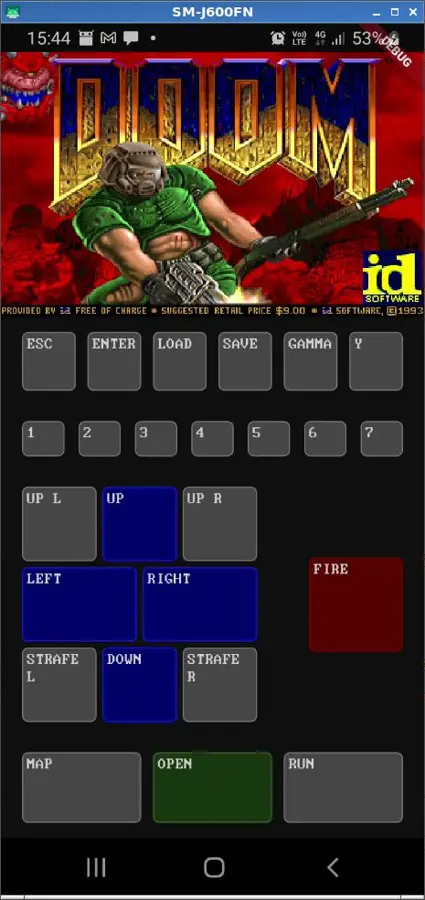 In the end, after many tests, I obtained this layout, which I am very satisfied with.
I won't go too much into the code details, but as I wrote above, the Directional Keys perhaps deserve a small in depth look.
First, I should mention that I didn't use GestureDetector, but I used the Listener, because unlike GestureDetector, it doesn't introduce latency, being the lowest level Widget for inputs.
The directional keys together are a single Listener, unlike all the other keys where each of them is a Listener.
Having a single Listener allowed me to manage not only the down and up gestures but also the move gesture. With every finger movement, a callback is invoked, which is responsible for figuring out which key is currently being pressed, based on the x/y coordinates of the pointer (the finger) relative to the area occupied by the square enclosing all the Directional Keys.
I am simplifying a lot; the matter is less trivial than this because, for example, during the move operation, the pointer can move out of the controller's area, so the button that was being pressed must be released, and eventually the pointer could also slide back into the controller's area, thus pressing a new key (or the same one released previously).
If you want to delve deeper, you can find everything in lib/keyboard/directional_keys.dart.
I have therefore limited myself to portrait view, and I also added a small piece of code to the Flutter Main which (in theory) should force this orientation.
I am very satisfied with the result nonetheless; it is now perfectly playable.
The gamma (brightness) can be adjusted on the fly. This flexibility allows for the best visibility even when the screen is not optimally viewable, such as playing outdoors during the day.
I've successfully implemented save/load functionality by modifying the relevant Doom source functions (I won't elaborate on the details of this process here).
CHAPTER 11 - Compiling on iOS
For the entire duration of this development, I used my old and trusty Samsung J6 smartphone with Android 10 as the target.
To validate the choice of Flutter, one crucial step remains: achieving a successful build on iOS.
I recently converted my old Thinkpad T530 into an Hackintosh, the time has come to dust it off.
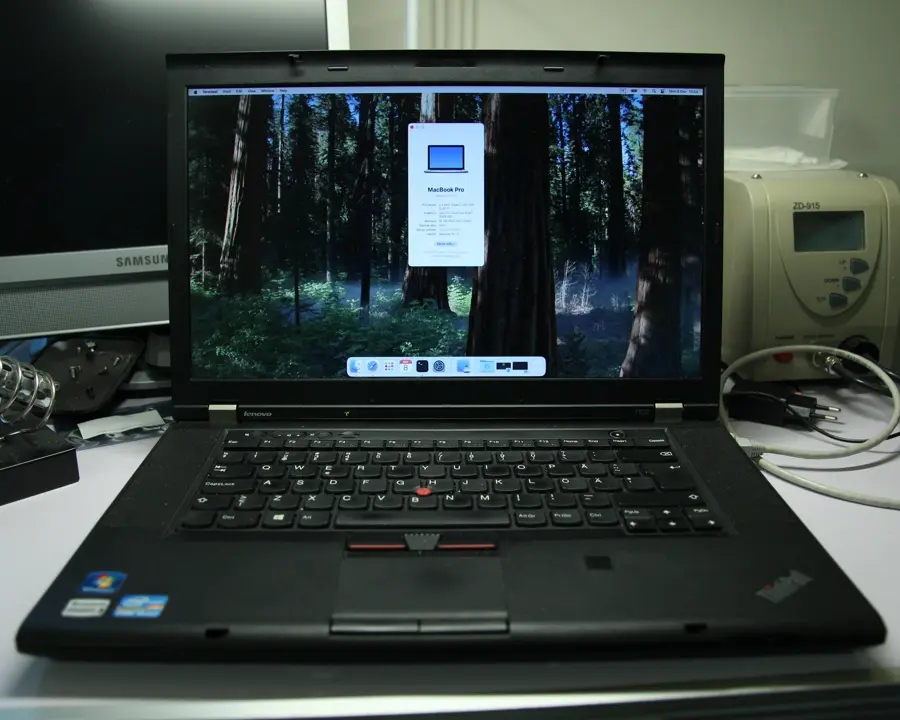 I am perfectly aware that using an Hackintosh to develop on Flutter is a discouraged practice, but it is only for testing purposes.
I have no intention of publishing apps compiled on the Hackintosh to the store, also because one would risk a major ban from Apple.
I could use a CI/CD service like Codemagic for that, but for this project, it's not needed.
It took me some time to figure out exactly what files needed to be placed in the ios directory to handle the C code compilation.
Some guides said to use Xcode and drag the sources into the Runner section, but the code was absolutely not compiling.
I tried a bit of everything without success.
In the end, I created a Flutter plugin with the "plugin_ffi" template:
flutter create --platforms=android,ios --template=plugin_ffi native_add
I took this command directly from the Flutter documentation. It allows you to create a template plugin with dart:ffi already configured to be compiled on both Android and iOS.
By analyzing the internal ios folder, I managed to understand what I needed to do.
I won't go into detail here; it involved moving all the C source code into the ios folder, otherwise it was ignored, creating a .podspec file, and modifying the section of the Dart code where the library is loaded.
You can view the exact changes in a commit directly within the project.
Finally, I was able to attempt compilation, and that's when I discovered that the Xcode compiler is a bit more demanding than the Android one.
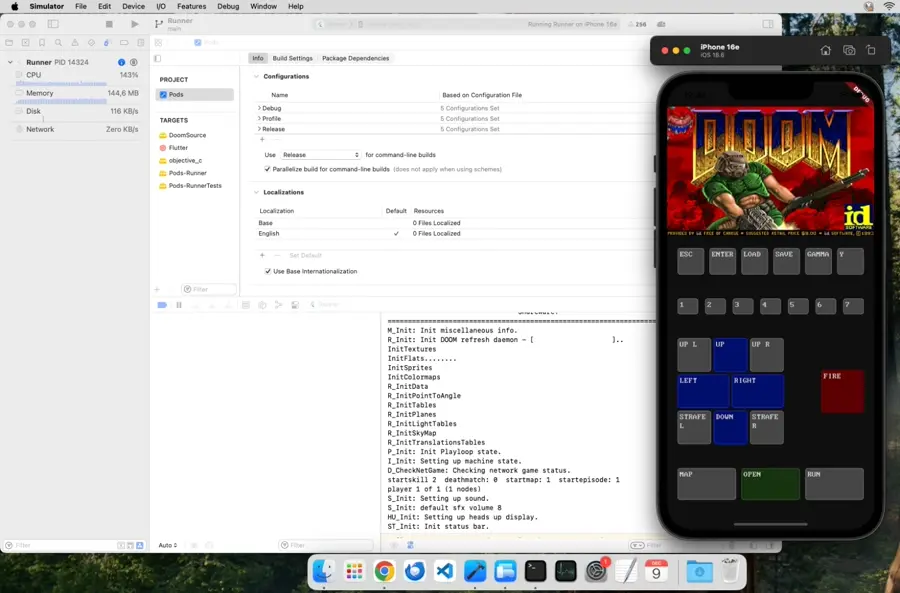
I went ahead and fixed the reported errors (they weren't anything shocking). After a few tries, the code finally compiled and ran without issue on the iOS Simulator :-)
Mission accomplished!
Conclusions
What can I say, it has been a very long ride.
This project allowed me to take a look inside the history of video games, and also to demonstrate the power and versatility of Flutter, not that there was any need.
Possible future developments:
- Audio
The game is completely silent at the moment. In the Linux version, audio effects were invoked asynchronously on another application that acted as an audio server. In the Flutter version, we need to figure out how to manage this. I haven't looked at all at how the Doom source code handles the entire audio part, so I'll set this aside for the future.
I think I'll come back to it because it could be interesting from an educational point of view. - Landscape mode
Perhaps with an on screen controller, semi transparent and integrated with the game screen. - Handling of hardware controllers
For example, with an external keyboard connected via the USB port, and perhaps even with a mouse (something I've never used to play Doom, but I know many people do). - User WAD loading
Currently, only the shareware version WAD works. With very small code modifications, it is still possible to load other WADs, but it would be nice if the end user could open them on the app. - Handling exiting the app
This is funny: currently, when you go into the game menu and choose to quit, the app actually closes.
But I didn't actually expect this, because I'm hitting a Segmentation Fault and the app is crashing completely :-)
To be honest, this also happens in the compiled Linux version. It's not a huge problem, but sooner or later I'll try to solve it.
I’m very happy with the final result of this article. I tried to include as much information as possible. I hope you find it useful.
It has been submitted and will be reviewed before being published.